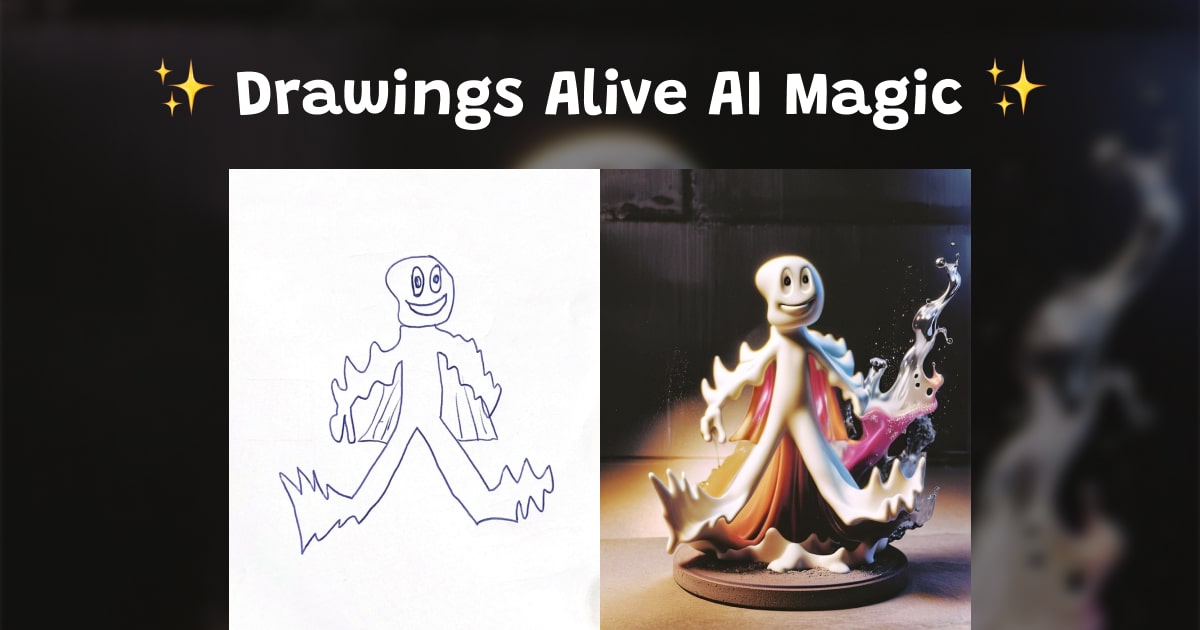
Sketch Monster Maker AI: Turn a Drawing into a Creature
If you searched for a sketch monster maker AI, you probably have a monster drawing already.
Maybe it is a kid’s creature with five eyes, tiny wings, giant teeth, or legs going in every direction.
That is exactly the fun part.
With Drawings Alive, you can upload a hand-drawn monster sketch and turn it into a polished creature while keeping the original idea visible.
The goal is not to replace the drawing.
The goal is to help the drawing become the monster your kid was imagining.
What is a sketch monster maker AI?
A sketch monster maker AI is a tool that uses your drawing as the starting point for a new monster image.
Instead of typing “make a monster” and getting a random creature, you begin with the actual sketch.
That matters because kid drawings are full of specific ideas:
- A lopsided head
- Extra arms
- Spiky hair
- Tiny claws
- A silly smile
- Strange wings
- One big eye or many little eyes
Those details are the personality of the monster.
Drawings Alive helps preserve that personality while adding color, texture, lighting, and style.
How to turn a monster sketch into an AI creature
Here is the simplest workflow.
Step 1: Draw a monster
Start on paper or draw directly in Drawings Alive.
Simple drawings work well. The monster does not need to be perfect.
In fact, the odd little details usually make the final creature better.
Try to make the outline clear enough to photograph. If the monster has important features, like horns, wings, claws, or a tail, draw them with strong lines.
Step 2: Upload the drawing
Take a clear photo of the sketch and upload it to Drawings Alive.
For best results:
- Put the paper on a flat surface
- Use bright, even light
- Keep shadows away from the drawing
- Crop out the table, hands, and background
- Make sure the full monster is visible
If the monster has a very light pencil outline, trace over the main shape before uploading.
Step 3: Describe the monster
The description helps the AI understand what matters.
You can keep it short:
Friendly blue monster with fuzzy fur, tiny wings, and one big eye.
Or give it more direction:
A cute swamp monster based on this child’s drawing. Keep the big round head, three horns, small claws, and silly smile. Make it colorful, friendly, and playful.
The best prompt usually describes three things:
- What the monster is
- Which sketch details to keep
- What style you want
Monster prompt ideas
Use these as starting points inside Drawings Alive.
Friendly monster
A friendly monster based on this sketch. Keep the shape and expression from the drawing. Make it colorful, soft, and fun, like a character from a kids adventure story.
3D creature
A 3D monster character based on this drawing. Keep the horns, eyes, arms, and body shape. Make it look like a playful creature toy with soft lighting.
Fuzzy monster
A fuzzy little monster with bright fur, big curious eyes, and small rounded teeth. Preserve the original sketch shape and make it cute, not scary.
Game monster
A game-style monster character based on this sketch. Keep the main silhouette and features. Add bold colors, clean details, and a fun creature design.
Storybook monster
A friendly storybook monster inspired by this child’s drawing. Keep the original pose and face. Make it whimsical, colorful, and safe for kids.
Best styles for monster drawings
Monster sketches work especially well when the style matches the child’s intention.
If the drawing is silly, try a cartoon or cute style.
If the drawing has claws, spikes, and dramatic shapes, try a 3D or game style.
If the monster is part of a classroom story or creative writing project, try a storybook or painting style.
Inside Drawings Alive, you can experiment with different outputs until the creature feels right.
Sketch monster maker AI vs text-only monster generators
A text-only monster generator can be fun, but it starts from words.
A sketch monster maker AI starts from the drawing.
That difference is important for parents, teachers, and kids because the child stays at the center of the creation.
The AI is helping finish the idea.
It is not inventing everything from scratch.
For creative play, classroom projects, or family art nights, that makes the result feel more personal.
Can you animate the monster too?
Yes.
After turning a monster sketch into an image, you can use Drawings Alive to create short animations from the result.
Try prompts like:
- Make the monster wave
- Make the monster dance
- Make the monster bounce happily
- Make the monster walk through a forest
- Make the monster roar in a cute way
This is great for kids who want to see their creature move, not just sit on the page.
Can you make a 3D-style monster?
Yes.
A monster sketch is a great starting point for a 3D-style character.
Use a prompt like:
Turn this monster drawing into a friendly 3D creature. Keep the original body shape, eyes, horns, and expression. Make it look like a colorful toy character.
If the sketch has important details, name them clearly.
For example:
Keep the three horns, striped tail, square teeth, and tiny wings.
That gives the AI a better chance of honoring the parts your child cares about most.
Ideas for parents and teachers
A sketch monster maker AI can be more than a quick image tool.
You can turn it into a full creative activity.
Try these ideas:
- Draw a monster and write its name
- Give it three special powers
- Describe where it lives
- Create a short monster story
- Turn the drawing into an AI image
- Animate the monster
- Share the before-and-after with family or classmates
For classrooms, this works well with creative writing, Halloween activities, character design, storytelling, and STEM discussions about traits, habitats, and adaptations.
Tips for better monster results
Clear sketches usually create stronger results.
Before uploading, check:
- Is the whole monster visible?
- Are the eyes, mouth, arms, legs, horns, or wings easy to see?
- Is the photo bright enough?
- Did you describe the most important details?
- Did you choose a style that matches the mood?
If the result changes too much, try a more specific prompt.
For example, instead of:
Make a monster.
Try:
Make a friendly purple monster from this sketch. Keep the round body, two antennae, four legs, and happy face. Do not change the pose.
Try Drawings Alive as your sketch monster maker AI
If you want a sketch monster maker AI that starts with your actual drawing, try Drawings Alive.
Upload a monster sketch, describe the creature, choose a style, and watch the drawing turn into something your kid can name, animate, and share.
The monster already exists on paper.
Drawings Alive just helps it step into the world.